

Early in June, I set up Hermes as my go-to harness on my MacBook Air (M4, 32 GB). I followed the tutorials at Nous and got it configured quickly with GPT 5.5, and then added some gateway services so I could access it remotely from my phone while traveling. I had been working with Codex, both as an IDE extension and using the Mac App for most of the year, so some aspects were familiar, but there was still a learning curve.
On my first business trip, I couldn’t help fiddling with Hermes Agent itself and I was amazed at how much I could customize. It felt a little like sawing off a branch while sitting on it: I added features and stopped/restarted the gateway multiple times while using the gateway. Eventually, I set up a local-branch repository for my customizations to avoid having all that work go up in smoke when the next update pulls.
The sorts of updates I made were to show footers in the gateway clients with tokens up/down and % context used. I also set up a general monitoring alert system. One alert keeps an eye on my OpenAI quota by periodically scraping the OpenAI analytics page (5h and week quotas); another keeps an eye on computer status (thermal, power, CPU and memory pressure); a final one tests to make sure that online services are all responding (endpoints for Hermes itself and openViking, internet connectivity in general, and health of the Hermes gateway).
After a few weeks of playing around with configuration, here is the current state:
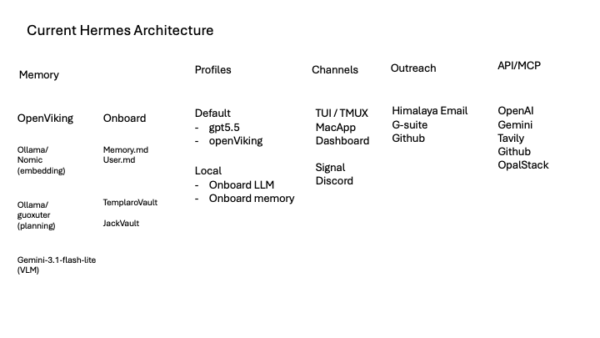
Hermes is set up with two profiles: the usual one for everyday use and a “local” one in case I have more material that I do not want shared with an online model. Profiles are useful compartmentalization, but I treat them as configuration/session/memory separation rather than a hard security sandbox. For the default profile, I use gpt 5.5 as my endpoint and have added openViking as a secondary memory manager. For the local profile, I use only Hermes’ core memory and a local general purpose model (Qwen3.5-9B-mlx-lm-mxfp4 or gemma-4-26B-A4B-it-qat-4bit).
OpenViking itself requires some support for embedding, planning, and extracting memories. In principle, all these could be done by a general purpose frontier model, but I chose to split the job up among two specialized models and one general purpose model. The default embedding model was bge-small-zh-v1.5-f16, a local GGUF embedding model run via llama-cpp-python. I decided not to retain that model as it is optimized for Chinese. OpenViking appears to have roots in ByteDance/VikingDB tooling, so the default embedding choice being Chinese-oriented makes sense. There is an English-optimized version, but after looking at what other people were using, I went with nomic-embed-text running on ollama. It may be a bit more than I need for that purpose, but it is still tiny and I am hoping that wide use means better support and problem resolution.
It was important to pick an embedding model early since embeddings produced by different models are generally incompatible (switching later would require existing memories to be re-embedded before they could participate properly in semantic retrieval).
I chose a planning model that also ran on ollama, guoxuter / ov_intent_analysis_sft:v7_q8, which is recommended by openViking. Strictly speaking, a dedicated planning model is not needed. Planning doesn’t require a lot of horsepower or deep reasoning, its purpose is to transform a natural-language query into compact retrieval intent / JSON-ish search plans. By keeping it local, not only do I avoid latency and token costs of sending it to a web-based model, but it also has a privacy advantage. The query planner receives the current search query plus some recent/session context or archive summaries, so this way that retrieval-planning prompt never leaves my machine.
Both of the ollama models load when needed, stick around for a bit in case they are needed again, and then are unloaded from memory. Nomic is about 0.3 GB loaded, guoxuter is around 1.3 GB, and other components are tiny: 64 MB for the ollama daemon and about 160 MB for the openViking server.
For the default profile, I have a lightweight Gemini model configured for OpenViking’s extraction/synthesis step. I used Gemini mainly because I recently realized I had quota available through my Google One / Google AI subscription. That let me generate a Google API key for OpenViking without putting these background extraction jobs on a paid OpenAI API key.
The Gemini account has relatively low limits including concurrency limits, so I have configured to not hit it with too much at once, but so far I have had no problems. Even if gemini were not reachable, the only degredation would be that new session memories would fail to process. If it is a short outage, they would likely be re-tried, but if longer, the source material is retained and can be processed later.
I did some limited experimenting with using a local model for extraction, but the task is relatively heavy and although it is possible, I do not want a largish local model loading intermittently into memory. Having only the embedding/planning local gives me a lot of memory to play with for other purposes.
Most of the other services that I have hooked in were a result of taking inventory of what subscriptions I already have. I’ve had a paid GitHub account forever since I maintain a number of private repositories.
I also created some new accounts: Tavily for web extraction. For now, I’m using the free tier and don’t seem likely to need more in the short term. To economize Tavily credits, I installed the free DuckDuckGo Search (DDGS), so Tavily is used only for extraction and not search.
To connect my agent to the outside world, I first enabled Himalaya to use IMAP via my OpalStack account. That works great for sending and receiving email to the agent’s own mailbox. Additionally, since I use Google Workspace tools frequently, I set up a Google account for my agent. I’m not about to hand over my Google password quite yet, but this means that my agent has their own gmail, calendar, etc., so if I want to share something via google drive, forward emails, share calendar items, that is all doable. The agent can at least see these items.
The broad lesson here is that the setting up an agent as a useful personal assistant means coordinating a lot of moving parts. Aside from the base model, you have to thinnk about local tools, memory, search/extraction, messaging gateways, and hooking everything up to web-based accounts. Hermes made that bundle hackable, but now I have to keep playing with it to turn it into something actually useful.